A searchable photo library for ministry media FFWPU Media
Gathers Family Federation event photos into one library, picks the best from each event and lets our team and their AI assistants search it in plain words.
The assessment is free, with no commitment. You answer about 15 questions and pick a time, or call +1 908 357 7801.
- 1CollectAlbum links, attachments and shared folders
- 2DescribeAI writes a caption and tags for each photo
- 3PickThe best photos from every event are kept
- 4SearchPlain words, from an AI assistant after Google sign-in
- 5UseA photo link for a video or a social post
About FFWPU Media
Our team finds event photos for videos and social posts with FFWPU Media, a photo library Pure Water Automations built. It collects Family Federation event albums, describes each photo, picks the best ones from every event and lets people and AI assistants search by plain words such as a place, a scene or a year.
Why we built FFWPU Media
Family Federation event photos were scattered across emailed album links, shared folders and photographers' galleries, and every video or social post began with a long hunt for a good picture.
How FFWPU Media works
FFWPU Media runs every night. It reads album links and photo attachments from a short list of senders, adds albums from existing shared folders and writes a description and tags for each new photo. For each event it keeps the best photos, with a limit on how many can come from one kind of scene.
People sign in with their Google account to search the library from an AI assistant. Only addresses on an approved list can get in, and a person can be removed at any time. There is no public website for it, and photos are not shown on this page.
What FFWPU Media does
One library for many sources
Albums come from emailed links, photo attachments from approved senders, shared Google Drive folders and public photo galleries.
Search in plain words
Ask for a scene, a place or a year, and filter by photo quality or by the best crop for a post.
The best photos from each event
Every event keeps its strongest photos, so a search starts with the pictures worth using.
Care for children and credits
A filter leaves out photos that show children, and a photographer's credit stays attached to each photo that has one.
Captions that stick to what is visible
Captions describe what can be seen and never guess at a person's name. A name appears only when it is written in the photo.
A spreadsheet view for people
A Google Sheet lists every event and photo, for team members who prefer scrolling to searching.
Questions about FFWPU Media
Can anyone search the photo library?
No. It is for our team and approved Family Federation staff. People sign in with Google, and only addresses on an approved list get access.
Does it recognize and name people?
No. Grouping photos by face was left out on purpose. Captions describe what is visible, and a name appears only when it is written in the photo itself.
Can you build a media library for our organization?
Yes. Searchable libraries and routine collection jobs like this are part of our custom automation work.
Technical details
- Node
- MCP
- Google Drive
- Google Sheets
- Gmail
- Gemini
Related work
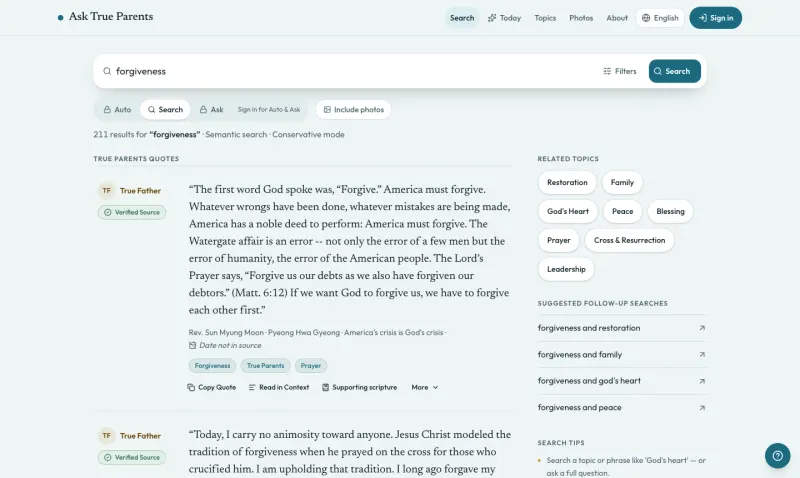
Ask True Parents
Search the published words of True Parents in plain language, and each passage comes back word for word with its source.
See the screenshotsVideo Core
Send in a recording and get back suggested cuts for filler words, long silences and bad takes. In our team console, one click accepts them all, and the original is kept.
See how it worksAutomation Engine
Runs routine jobs on a schedule or when another app asks, and its email, WhatsApp and Telegram steps can wait until someone approves the message.
See how it worksStop hunting through emails and folders for the right event photo
Name the folder, inbox or shared album where your event photos pile up, and who goes looking through it each time.
The assessment is free, with no commitment.
- Email purewaterva58@gmail.com
- Call +1 908 357 7801