Videos and graphics for our apps and our team Motion Studio
Makes promo videos, explainers, release videos and graphics from real screen recordings, with a check and a person's yes before each step moves on.
The assessment is free, with no commitment. You answer about 15 questions and pick a time, or call +1 908 357 7801.
- 1BriefWhat it is for, who watches and the feel
- 2ScriptNarration or lyrics, checked against what the app really does
- 3RecordThe real app, from a test login
- 4StoryboardOne still per scene to approve
- 5CutThe finished video, checked and watched through
- 6DeliverShared or posted only after a person says yes
About Motion Studio
Our team makes promo videos, explainers, release videos and newsletter graphics with Motion Studio, a toolkit Pure Water Automations built. An AI assistant does the drafting and editing, while a person approves the brief, the script, the storyboard and the finished cut before anything goes out.
Why we built Motion Studio
Showing a client or a congregation what an app does takes a good video, and making one by hand takes days of recording, scripting and editing for every update.
How Motion Studio works
Team members describe what they want in plain sentences, such as a 60-second explainer for a booking site. Motion Studio then works through the video in stages and stops at each one with a review page to look at.
It records the real app from a test login, so no real person's information appears on screen. Anything shared with a client or posted to YouTube waits for a clear yes from a person on our team.
What Motion Studio does
Eight kinds of video and graphic
A music video, a product explainer, an explainer for any idea, a trailer, a release video, a weekly work report, a team training video or a newsletter graphic.
Real screens, not mock-ups
It records the app being used, then trims and speeds each clip to fit the scene.
A person decides at each stage
The brief, script, storyboard and finished cut each get a review page, and the work stops there until someone approves it.
A check against made-up features
The script is compared with a list of what the app really does, and any feature that is not on the list is flagged.
Checks on the finished cut
It flags banned words on screen, a web address that appears too rarely, captions that repeat the big words, and sound that is too quiet or too loud.
Review links for clients
A video can get a private screening link where a client leaves timestamped notes, and each note gets an answer.
Questions about Motion Studio
Does anything get posted without someone approving it?
No. Uploads to YouTube default to unlisted and wait for a clear yes from Justin or a team lead. A screening link for a client is sent by the person working with that client.
Is Motion Studio a website I can sign in to?
Not today. Our team runs it from their own computers with an AI assistant. It has no public website.
Can you make a video for our app or ministry?
Yes. Videos and graphics for apps, releases and weekly work reports are part of what we make for clients.
Technical details
- Python
- HyperFrames
- Playwright
- ffmpeg
- ElevenLabs
Related work
Video Core
Send in a recording and get back suggested cuts for filler words, long silences and bad takes. In our team console, one click accepts them all, and the original is kept.
See how it worksAutomation Engine
Runs routine jobs on a schedule or when another app asks, and its email, WhatsApp and Telegram steps can wait until someone approves the message.
See how it works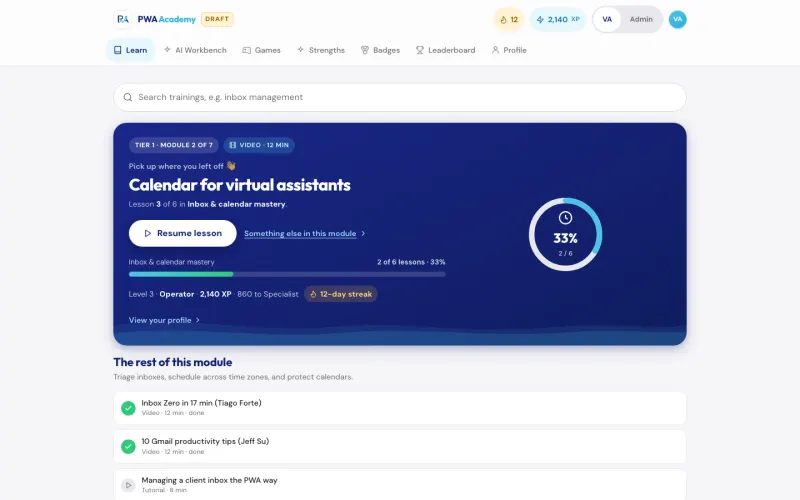
PWA Academy
The training portal we built for our virtual assistants, from their first ten hours of onboarding to Tier 4, our most senior level, with a quiz and a graded task in every module.
See the screenshotsGet a short video that shows what your app or your week of work really does
Name the app, event or weekly update you keep meaning to explain on video, and who it is for.
The assessment is free, with no commitment.
- Email purewaterva58@gmail.com
- Call +1 908 357 7801