Virtual assistants and custom software

Church apps we built for Sunday attendance, event planning and sermon preparation

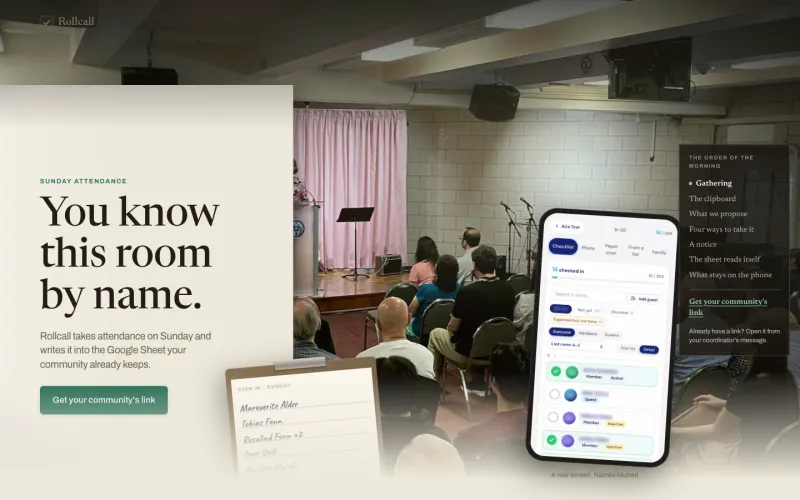
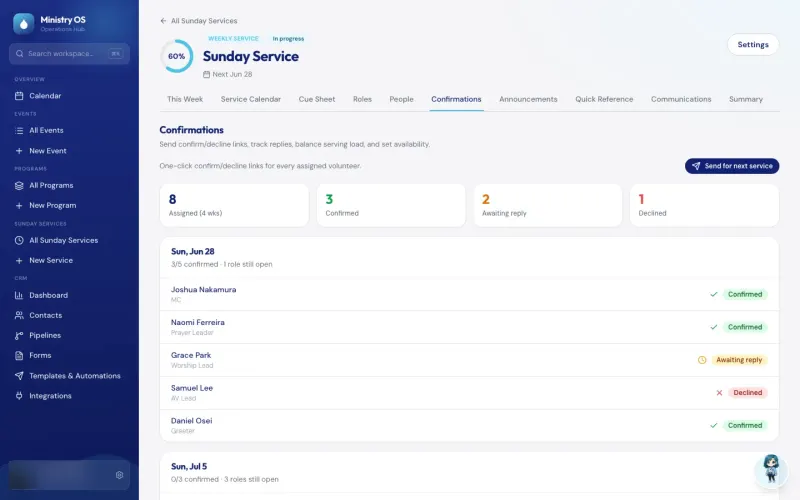
Rollcall takes Sunday attendance on a phone and writes it to your community's Google Sheet. Ministry OS replaced a spreadsheet planner with one app for events and Sunday services. Pure Water Automations (PWA) builds software like this and also provides trained virtual assistants. Screenshots come from the working apps. Most use sample data, and any real names are blurred.

The assessment is free, with no commitment. You answer about 15 questions and pick a time, or call +1 908 357 7801.

We also support nonprofits. See our services for nonprofits

Projects shown
20
Live for their users
6
Used by our own team
6
Names blurred
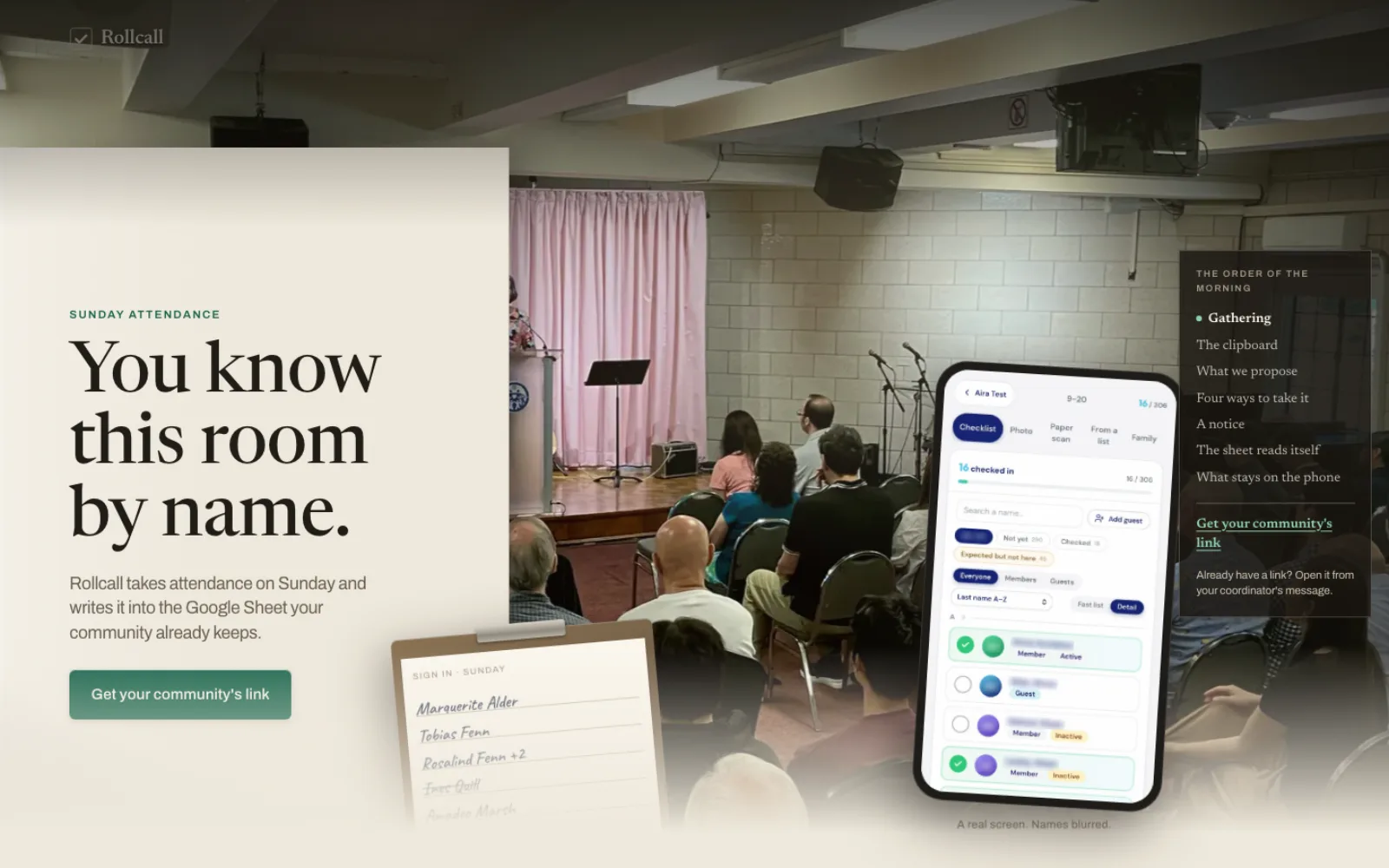
Rollcall's welcome page, with a phone showing the Sunday check-in screen
Rollcall · Live. Sunday attendance on a phone, saved to your community's Google Sheet.
Beta featureSample data
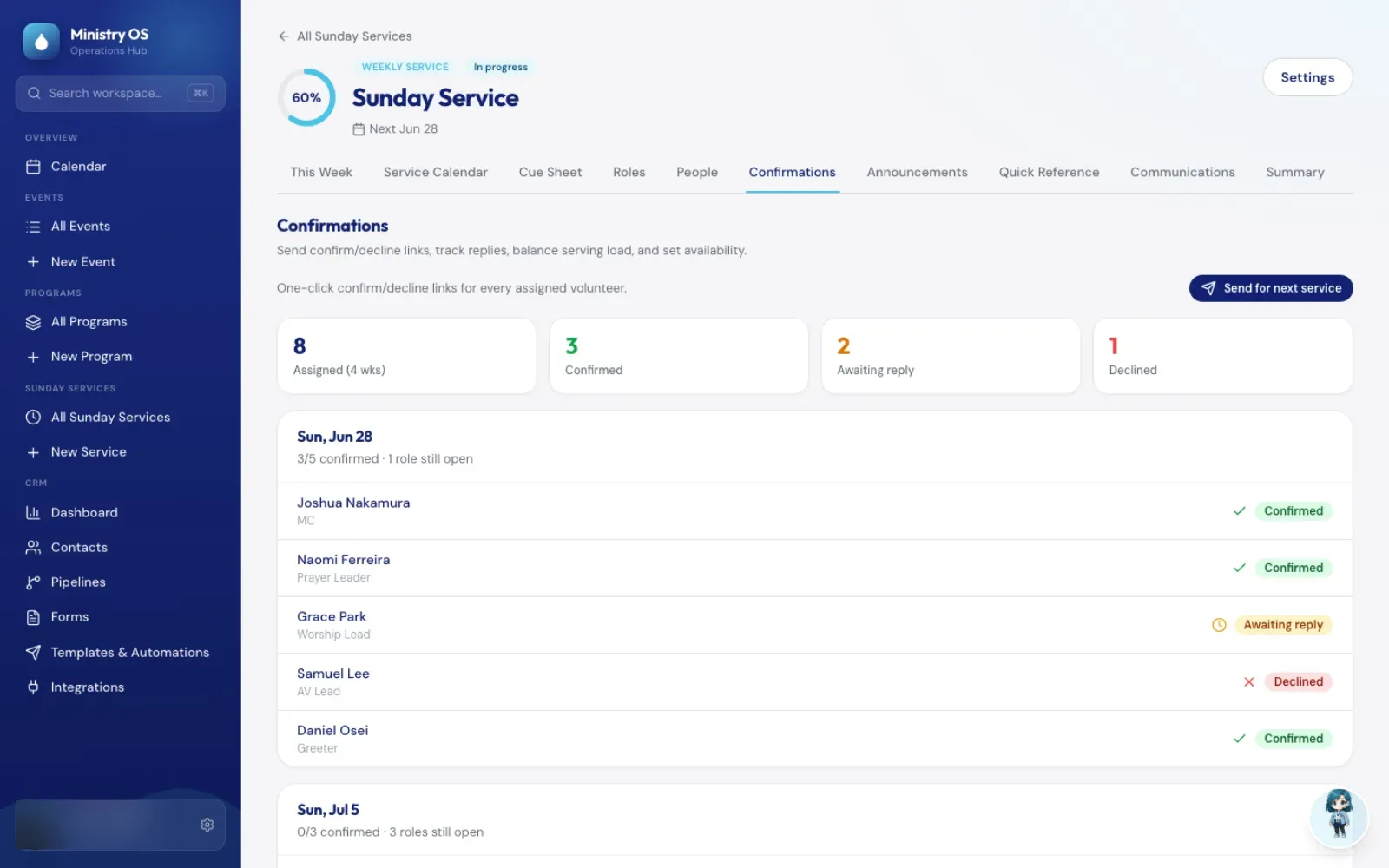
Volunteer confirmations for a Ministry OS Sunday service, a feature in beta
Ministry OS · Live. Events, programs and Sunday services in one workspace.
Live results
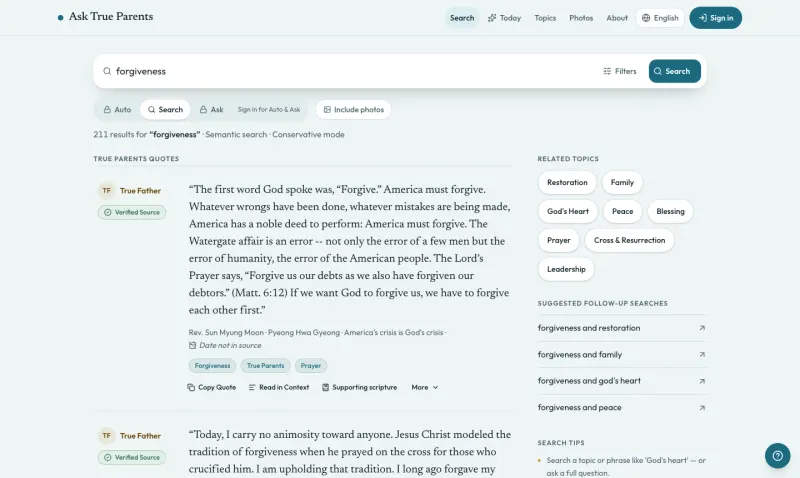
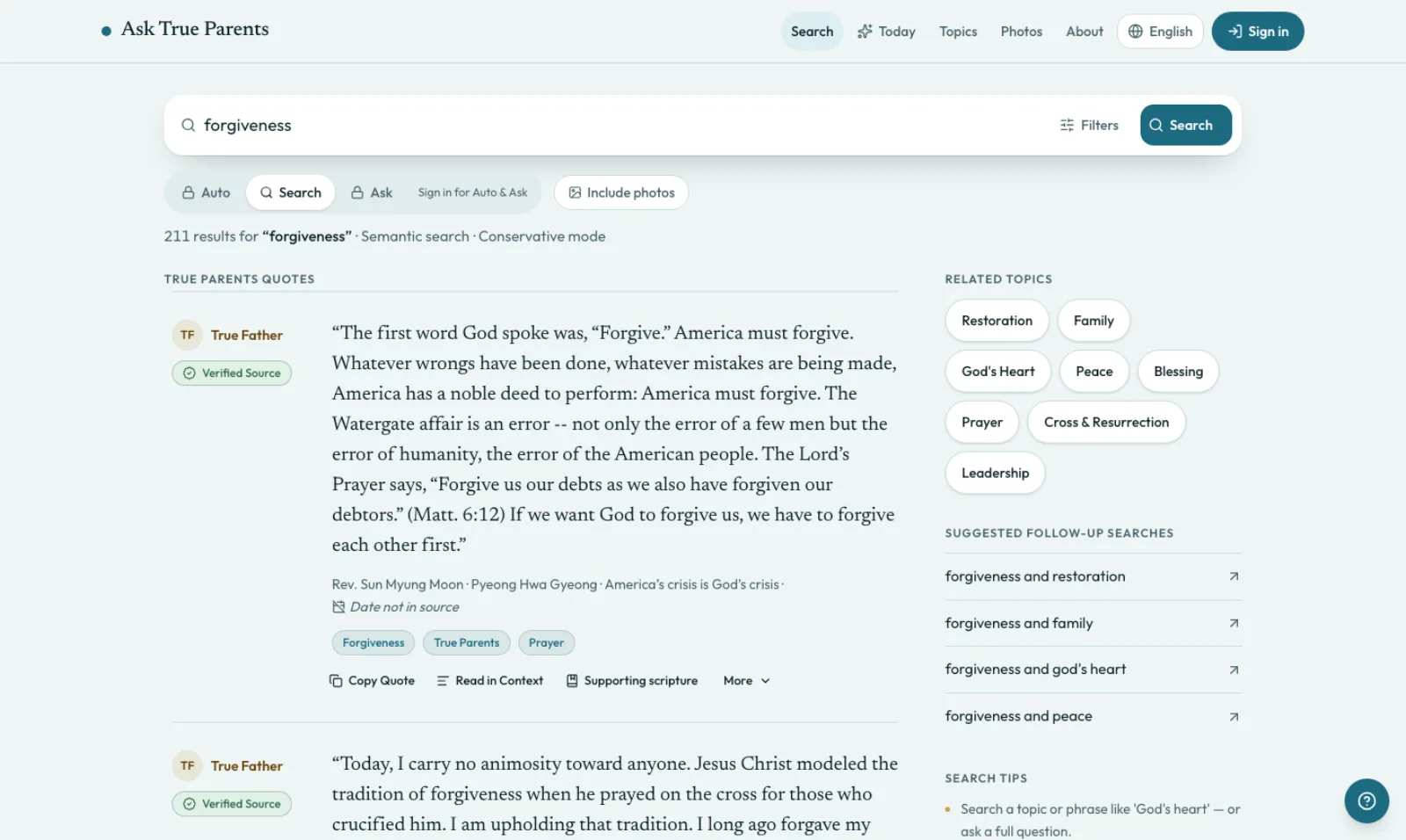
Ask True Parents search results for "forgiveness", each showing its speaker and source
Ask True Parents · Public beta. Search about 20,300 passages of True Parents' words by meaning, each with its source.
Already built

Church and team work we have built apps for

Apps built on your Google Sheets

Attendance starts on a paper sign-in sheet, and the Google Sheet only fills in when someone types it up.

What we built

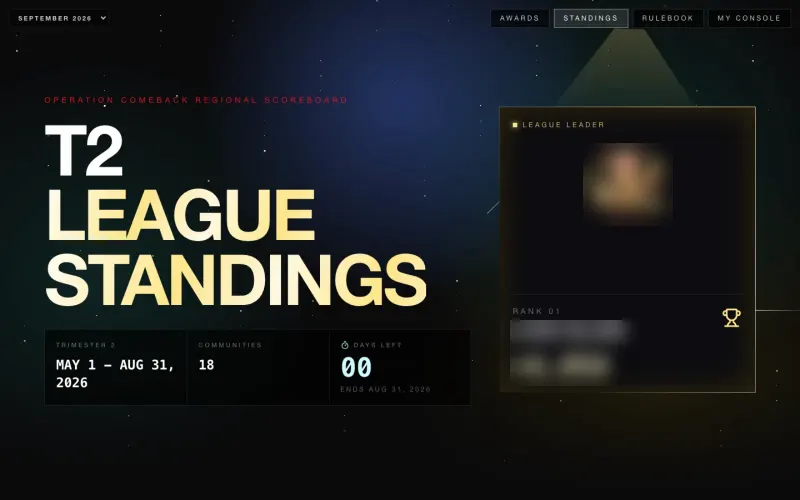
Rollcall takes attendance on a phone, even from a photo of the paper sheet, and writes it into your community's Google Sheet. The Operation COMEBACK Console turns the regional Google Sheet its leaders update into a scoreboard for 18 communities.

Events, Sunday services and announcements

Each event is planned in a spreadsheet, then written up again for every channel and every team that needs to know.

What we built

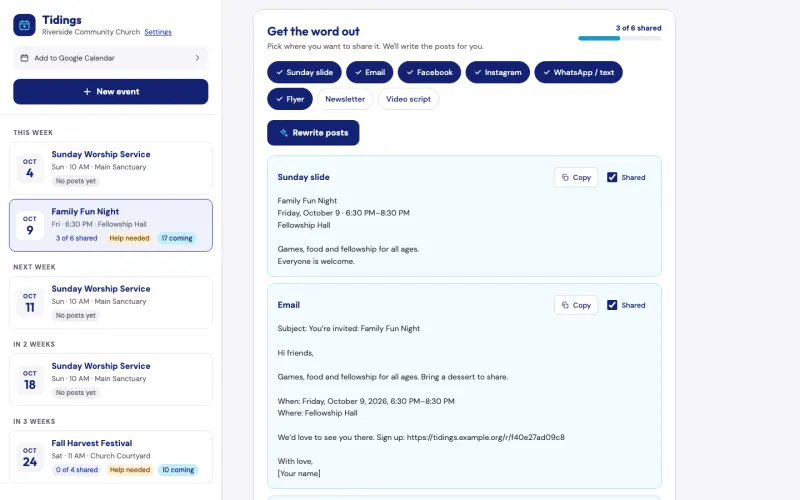
Ministry OS gives events, programs and Sunday services one shared workspace, with an AI coach that drafts new plans. Tidings drafts a post for each channel from one event description and turns your note to your teams into one email.

Search your own library, with sources

Preparing a talk means finding the right passage, then tracking down its exact citation.

What we built

Ask True Parents searches about 20,300 passages by meaning and returns each one word for word, with its speaker, book and section. Signed-in users can ask a full question and get an answer drawn only from the passages it found.

Courses, training and coaching

Members go to one site for their lessons and to another to talk about them.

What we built

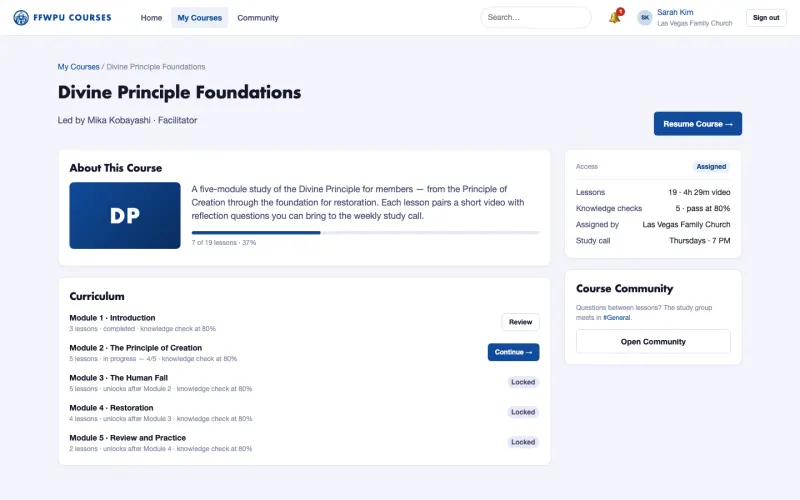
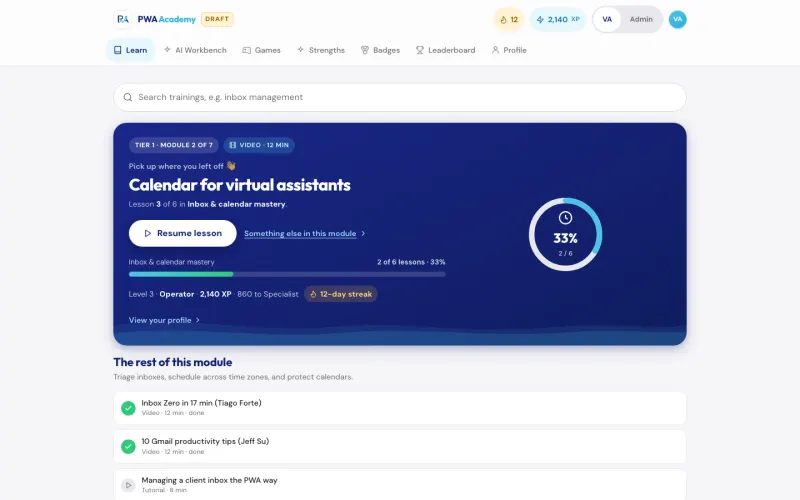
FFWPU Courses, being built for Family Fed USA, puts courses, knowledge checks and member discussion on one site. PWA Academy lays out the path for our new assistants from the trainee period to Tier 4, our most senior level. WISER Goals shows a coach each person's goals while their daily log stays private.

Bookings and invoices

Members ask to use a space, and each request needs a date, a price and an invoice.

What we built

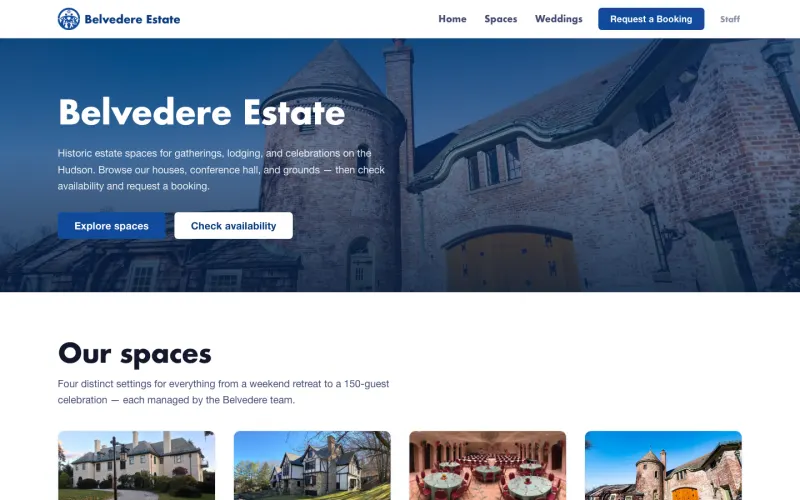
Belvedere Estate Booking lets members browse four spaces and a garden tour, send a request and see an estimate. Staff review every request before it is confirmed, then the site makes a numbered invoice. Community members can also reserve Training Center rooms by the hour, and the pastor confirms each one.

Scheduled jobs, email and recordings

The same reminders, reports and follow-up messages go out by hand every week.

What we built

Automation Engine runs our own team's scheduled jobs, and its email, WhatsApp and Telegram steps can hold a message until someone approves it. Email Core sends email for apps such as Ministry OS and never writes to anyone who unsubscribed. Video Core suggests cuts in recordings, and in our team console one click accepts them all.

The work

Apps, team tools and services we have built

For nonprofits, the nearest matches are Tidings for event sign-up pages, Automation Engine for scheduled jobs with an approval step and Email Core for email that skips anyone who unsubscribed.

For churches and ministriesLive

Rollcall

Take Sunday attendance on a phone, or photograph the paper sign-in sheet, and the names land in the Google Sheet your community already keeps.

See the screenshots
For churches and ministriesLive · Guest follow-up in beta

Ministry OS

Plan events, programs and Sunday services in one app instead of separate spreadsheets, with an AI coach for new plans and a link that lets volunteers claim an open MC or prayer leader slot.

See the screenshots
For churches and ministriesLive · Public beta

Ask True Parents

Search the published words of True Parents in plain language, and each passage comes back word for word with its source.

See the screenshots
For churches and ministriesPilot · Feedback round with pastors

Tidings

Describe a church event once, and Tidings drafts a post for each channel, turns your note to your teams into an email and can add a sign-up page. It is free for pastors, and we can show it to you on the assessment call.

See the screenshots
For churches and ministriesPilot · Members-only preview

Belvedere Estate Booking

A members-only site for requesting spaces at Belvedere Estate, with staff review and numbered invoices.

See the screenshots
For churches and ministriesPilot · Proof of concept

Operation COMEBACK Console

A scoreboard that ranks 18 Northeast church communities from the regional Google Sheet their leaders already update, with a console for each community's pastor.

See the screenshots
For churches and ministriesIn development

FFWPU Courses

Courses, knowledge checks, certificates and member discussion on one members-only site, which we are building for Family Fed USA.

See the screenshots
For churches and ministriesLive · Used for the STRATCOM Summit

Summit Form

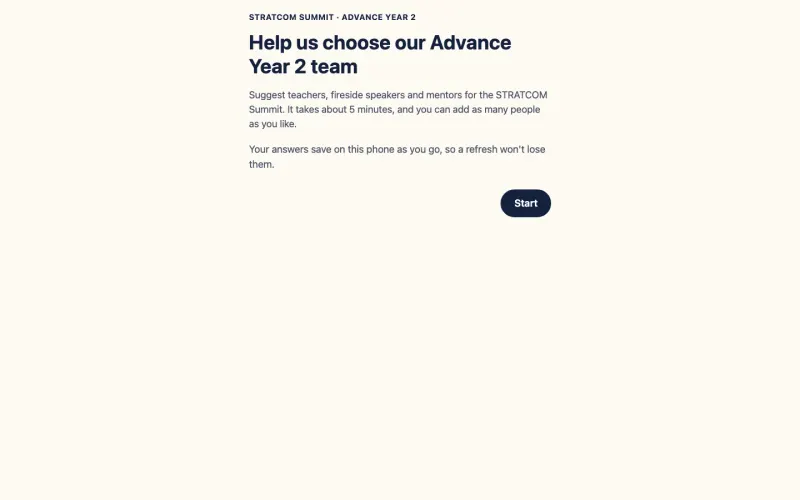
People suggest teachers, fireside speakers and mentors for a ministry summit in one sitting, with no login, and every name lands in a Google Sheet.

See the screenshots
For coachesPilot

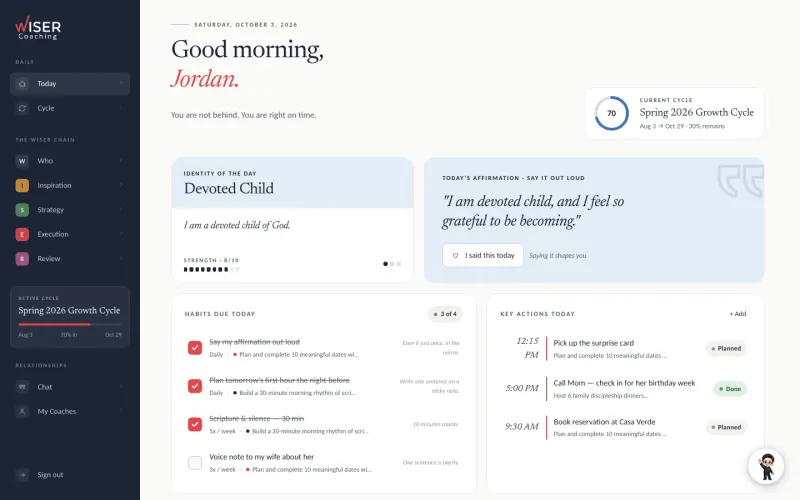
WISER Goals

Set goals around who you want to become, in 90-day cycles, with a coach who follows your progress while your daily log stays private.

See the screenshots
What our own team runs onLive

PWA Academy

The training portal we built for our virtual assistants, from their first ten hours of onboarding to Tier 4, our most senior level, with a quiz and a graded task in every module.

See the screenshots
What our own team runs onIn use by our team

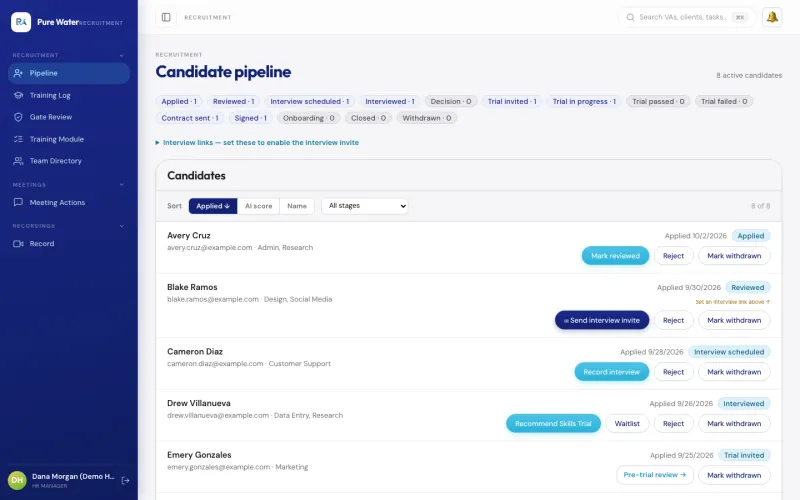
VA Management Console

The app our own virtual assistant team uses for hiring a new assistant, assigning tasks, tracking hours and running payroll.

See the screenshots
What our own team runs onPilot

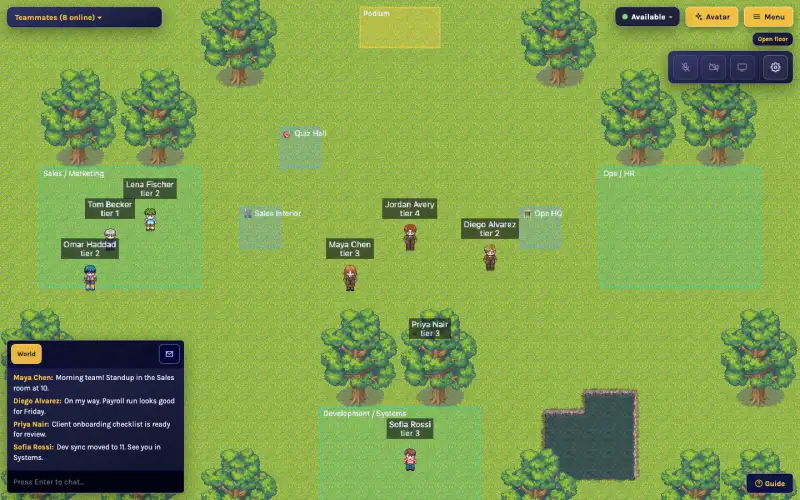
VA World

An online office we built for our remote assistants, where walking up to a teammate starts a video chat.

See the screenshots
What our own team runs onIn development · Internal tool, not public yet

Ad Grants Eligibility Screener

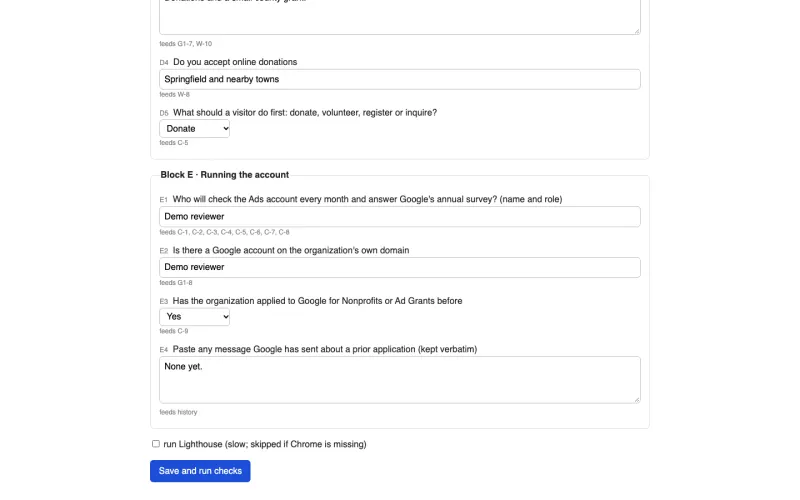
Checks a nonprofit against Google's Ad Grants rules on the first call and returns what to fix, in order, before anyone spends hours on an application.

See the screenshots
What our own team runs onIn use by our team

FFWPU Media

Gathers Family Federation event photos into one library, picks the best from each event and lets our team and their AI assistants search it in plain words.

See how it works
What our own team runs onIn use by our team

Motion Studio

Makes promo videos, explainers, release videos and graphics from real screen recordings, with a check and a person's yes before each step moves on.

See how it works
What our own team runs onIn development

Pure Focus

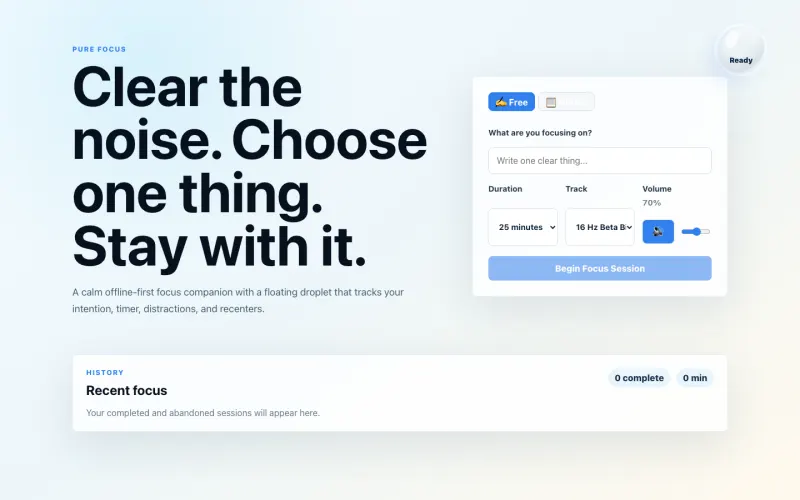
A calm focus timer that keeps one task in front of you, plays background music and, on the Mac, marks the task done in your to-do sheet.

See the screenshots
What our own team runs onLive

PWA Whiteboard

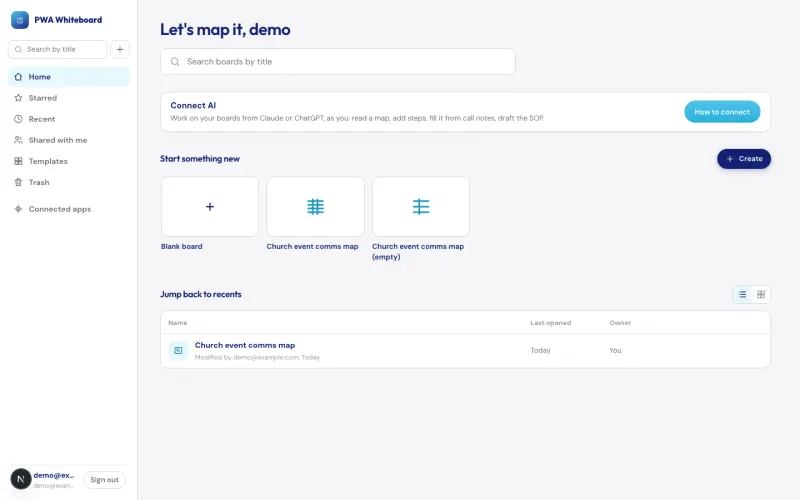
Map how your church gets the word out, live with your pastor on a shared board, then turn the map into a first draft of the written steps.

See the screenshots
Behind the scenesIn use by our team

Automation Engine

Runs routine jobs on a schedule or when another app asks, and its email, WhatsApp and Telegram steps can wait until someone approves the message.

See how it works
Behind the scenesIn use by our team

Email Core

The email service some of our apps send through, including Ministry OS when no Gmail account is connected. It skips anyone who unsubscribed, won't send a retried email twice and holds big campaigns for a person to approve.

See how it works
Behind the scenesIn use by our team

Video Core

Send in a recording and get back suggested cuts for filler words, long silences and bad takes. In our team console, one click accepts them all, and the original is kept.

See how it works
How we build

How our apps handle your work and your records

A person can check the work before it goes out

  • Tidings drafts a post for each channel, and the pastor copies each one out and posts it.
  • Belvedere Estate Booking turns each request into a pending hold, and staff review it before it is confirmed.
  • FFWPU Courses keeps a new course hidden until an administrator publishes it.
  • Ask True Parents labels Bible passages as supporting references and never presents them as True Parents' words.
  • Automation Engine can hold its email, WhatsApp and Telegram messages until a person says yes.

Where your records live

  • Rollcall keeps each community's roster and attendance in the community's own Google Sheet.
  • Rollcall matches faces on the phone during photo roll call. The photos stay on the device, and for each confirmed person Rollcall keeps a small crop of the face and a set of face measurements on its own server for the next check-in.
  • The Operation COMEBACK Console reads the regional Google Sheet that its leaders update.
  • Ministry OS can send messages from your ministry's connected Gmail and copy Sunday services to Google Calendar.
  • Tidings puts every event in Google or Apple Calendar after a one-time subscription, and it also comes as a Google Sheet version.
Services

Ways to work with us

Hand us the weekly work, have us build a tool, or ask about both on your assessment call.

A virtual assistant team

Trained assistants take on your weekly admin, such as website updates, Sunday service slides, video editing, newsletters and reports. A team leader oversees the work on every nonprofit plan and on church plans from $800 a month. Every plan is month-to-month, and plans start at $200 a month.

A custom app or automation

We design and build tools like the ones on this page. That can be an app that works on top of your Google Sheets, or one that replaces a spreadsheet system you have outgrown. On our own apps, Ministry OS and the VA Management Console, new features are tried on a separate test copy before they reach the live app, and the console's records are backed up before each release. We talk through cost on the free assessment call.

Our own team console ran on Google Sheets until it grew slow to open and its hiring steps had bugs, so we rebuilt it as a web app and kept a read-only copy of the sheet. Today our assistants take work through that console. We built PWA Academy to train them and VA World as their virtual office.

Next step

How the free assessment works

The call is about what your team does by hand today.

  1. Answer about 15 questions on your team and the work you want help with.

  2. Pick a time to talk.

  3. We tell you what we could build, or what a virtual assistant could take off your plate.

Questions

Common questions

Do you only work with churches?

No. Much of our work is for churches and ministries, many in the Family Federation community. We also support nonprofits and small teams, and this page includes a coaching app and the tools our own remote team runs on. Nonprofits can read about our support at nonprofits.purewaterautomations.com.

Which of these are running today?

Twelve of the 20 are running today. Six are open to their users at public addresses, and six are tools and services our own team uses. Tidings, the Belvedere booking site, the Operation COMEBACK Console, WISER Goals and VA World are pilots, and FFWPU Courses is in development. Each card shows its status.

Do we have to give up the Google Sheets we already use?

No. Rollcall reads and writes each community's own Google Sheet, so the roster and attendance stay where they are. The Operation COMEBACK Console reads the regional Google Sheet that its leaders update, and Tidings also comes as a Google Sheet version. When our own team console moved to a database, it kept a read-only Google Sheet copy so people could still check the data the way they always had.

Can you replace a spreadsheet system we have outgrown?

Yes. Ministry OS replaced an event planner built on Google Sheets with custom scripts, and the VA Management Console replaced a long-running Google Sheets system that had grown slow.

Will AI send anything without a person checking?

Not in Tidings, Email Core or FFWPU Courses. Tidings drafts each post and the pastor posts it, and a course built with AI stays hidden until an administrator publishes it. In Automation Engine, each email, WhatsApp or Telegram send step can be set to wait for a yes, and we choose which ones do for each job.

Are the screenshots real?

Yes. They come from the working apps. Most are filled with demo or sample data, and where real names or scores could appear, we blurred them. Ask True Parents shows its real published library. Five behind-the-scenes services have no screen of their own, so their pages show a diagram of how the work flows.

Can we try one?

Six are open at public addresses: attendance.familyfed.org (opens in a new tab), ministryos.cloud (opens in a new tab), asktrueparents.online (opens in a new tab), summit.famfedsites.online (opens in a new tab), academy.purewaterautomations.com (opens in a new tab) and whiteboard.purewaterautomations.com (opens in a new tab). Some ask you to sign in or enter a community PIN, and the Academy's public site shows the lessons only. For the others, ask for a walkthrough on your assessment call.

How much does a custom app cost?

It depends on what you need, so we talk through cost on the free assessment call. Our virtual assistant plans start at $200 a month and run month to month. Full prices are on the church pricing and nonprofit pricing pages.

We aren't sure whether we need an app or an assistant. Where do we start?

Start with the free assessment. Tell us what your team does by hand today, and we will tell you whether an assistant, a custom tool or both would help.

What happens when I book the free assessment?

You answer about 15 questions on your team and the work you want help with, then pick a time to talk. On the call we tell you what we could build or take off your plate. It's free, with no commitment.

Tell us what your team still does by hand

Book a free assessment, or email us about one task you would like to hand off. We will point you to the closest thing we have already built.

The assessment is free, with no commitment.